
This WooCommerce filter solved a common kind of problem: the client needed a straightforward filter, but the available theme and plugin options were either unreliable, too bloated, or far more configurable than the site actually needed.
What They Needed
They needed a WooCommerce filter for specific product categories that behaved cleanly on the frontend and stayed easy to work with behind the scenes.
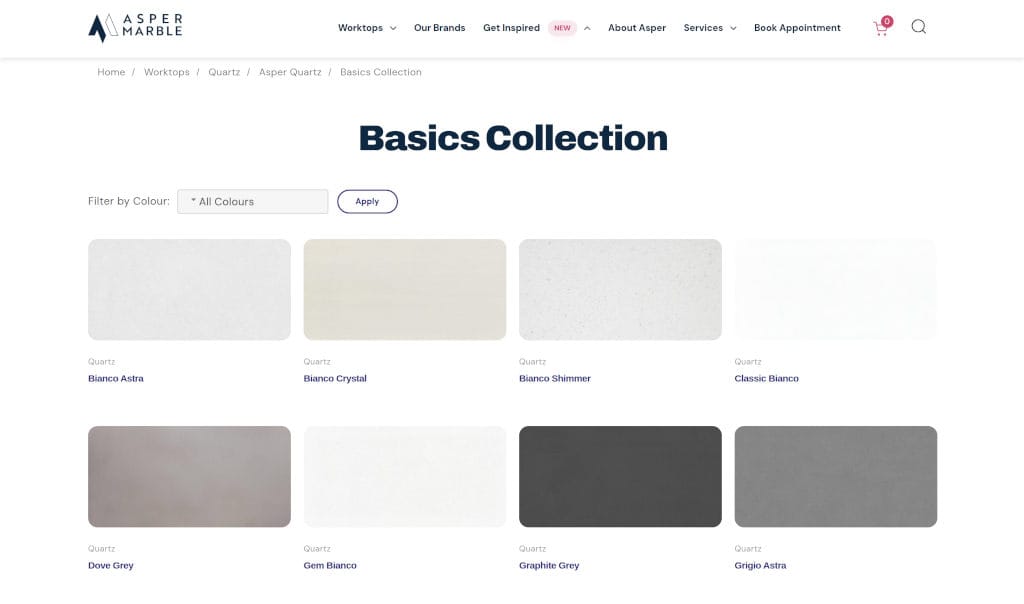
- Colour filtering based on real product attributes.
- Filter output only where it was actually relevant.
- A lightweight implementation instead of another heavyweight filtering plugin.
- Compatibility with the existing theme and archive pages.
The visible requirement sounded simple, but the important part was making sure the solution fit the real site instead of fighting it.
How I Helped
A WooCommerce Filter Instead Of A Plugin Workaround
I treated it as a WooCommerce Services and Custom WordPress Development job rather than trying to tune another filtering plugin into submission.
- I built a custom colour filter that populates dynamically from visible products and their assigned attributes.
- I made the filter appear only when colour filtering was relevant to the category being viewed.
- I allowed it to be injected programmatically or output via shortcode depending on the page setup.
- I resolved a separate theme issue involving jQuery UI styles not being loaded correctly on archive pages.
- I handled smaller follow-up tweaks after launch, including file-path fixes and excluding some categories temporarily where needed.
This was a good example of using custom code to simplify the result rather than overcomplicate it.
Results
The store got a cleaner and more usable product filter without extra frontend clutter.
- Customers can filter products by colour more reliably.
- The filter only appears where it makes sense.
- The implementation is lighter than the plugin-heavy alternatives the client had already tried.
- Theme-related styling issues were resolved as part of the work.
The main gain was not a flashy feature. It was removing friction from product discovery without creating more technical mess elsewhere.
Related Work
If you want to see more project work, my Portfolio is the best place to continue.
For stores with awkward category filters, product-display issues, or plugin-heavy workarounds, WooCommerce Services is a good place to start.
If the filter or frontend behaviour depends on tailored code rather than standard plugin settings, Custom WordPress Development is also worth a look.
Why It Worked
This worked because the solution stayed tightly aligned with the actual requirement.
The main decisions that mattered were:
- building a focused filter instead of using an overly broad plugin
- generating the filter from the site’s real product data
- resolving the surrounding theme issue instead of treating it as someone else’s problem
- keeping the output flexible without making the implementation heavier than it needed to be
That is what made the result feel clean rather than bolted on.